3D Printer Nozzle Wear: Signs, Causes, and When to Replace
Your Nozzle Is a Consumable Part — Treat It Like One
Most 3D printer users don’t think about their nozzle until something goes wrong. But here’s the thing: nozzles wear out. They’re a consumable part, just like brake pads on a car. And a worn nozzle causes subtle quality issues that you might spend hours troubleshooting before realizing the problem is a tiny piece of metal you could replace in five minutes for a couple of dollars.
In this guide, we’ll cover how to tell when your nozzle is worn, what causes premature wear, and how to choose the right nozzle material for your filaments so you get the most life out of each one.
How Nozzle Wear Happens
A standard brass nozzle has a precisely drilled hole — typically 0.4 mm in diameter — through which molten filament is forced at high pressure. Over time, that hole gets larger as material scrapes against the inside walls.
Three factors drive nozzle wear:
1. Abrasive Filaments
This is the number one killer of brass nozzles. Any filament with hard particles embedded in it acts like liquid sandpaper flowing through your nozzle:
- Carbon fiber reinforced: The CF particles are extremely hard and abrasive. A brass nozzle printing CF-PLA can wear out in 100–200 grams of filament.
- Glass fiber reinforced: Similar to carbon fiber in abrasiveness.
- Glow-in-the-dark filament: Contains strontium aluminate particles that are surprisingly abrasive. Many users don’t realize this until their nozzle is destroyed.
- Metal-filled filament: Bronze, copper, and steel-filled filaments wear nozzles quickly.
- Wood-filled filament: Mildly abrasive due to the wood fiber particles.
- Marble PLA: Contains calcium carbonate particles that cause moderate wear.
2. Print Volume
Even with non-abrasive filaments like plain PLA, nozzles eventually wear out from sheer volume. Brass is a soft metal. After hundreds of hours of printing, the internal geometry gradually degrades. Expect a brass nozzle to last 200–500 print hours with standard filaments.
3. Cleaning Damage
Aggressive cleaning with steel needles, drill bits, or improper cold pull technique can physically damage the nozzle bore. The 0.4 mm hole is tiny — it doesn’t take much to scratch or enlarge it. Always use brass cleaning needles (softer than the nozzle) rather than steel ones.
The 7 Signs Your Nozzle Is Worn
1. Inconsistent Extrusion Width
A worn nozzle has an irregular bore — no longer a perfect circle. This causes the extrusion width to vary as filament flows through at different angles. You might notice some lines are thicker than others, even on straight walls with consistent speed.
2. Under-Extrusion That Can’t Be Fixed
If you’ve calibrated your E-steps, checked for clogs, and adjusted flow rate but still see under-extrusion, the nozzle might be worn internally. A damaged bore disrupts the smooth flow of filament, leading to inconsistent output.
3. Loss of Fine Detail
A 0.4 mm nozzle that’s worn to 0.5 mm can’t produce the same level of detail. You’ll notice that fine features, small text, and thin walls look blurry or bloated compared to how they looked when the nozzle was new.
4. Increased Stringing
A worn nozzle opening allows filament to ooze more easily during travel moves. If your stringing suddenly gets worse without any settings changes, nozzle wear could be the cause.
5. Rough First Layer
The nozzle tip surface matters for first layer quality. A worn, pitted, or damaged tip doesn’t press filament into the bed as evenly, leading to rough or inconsistent first layers.
6. Visible Wear on the Nozzle Tip
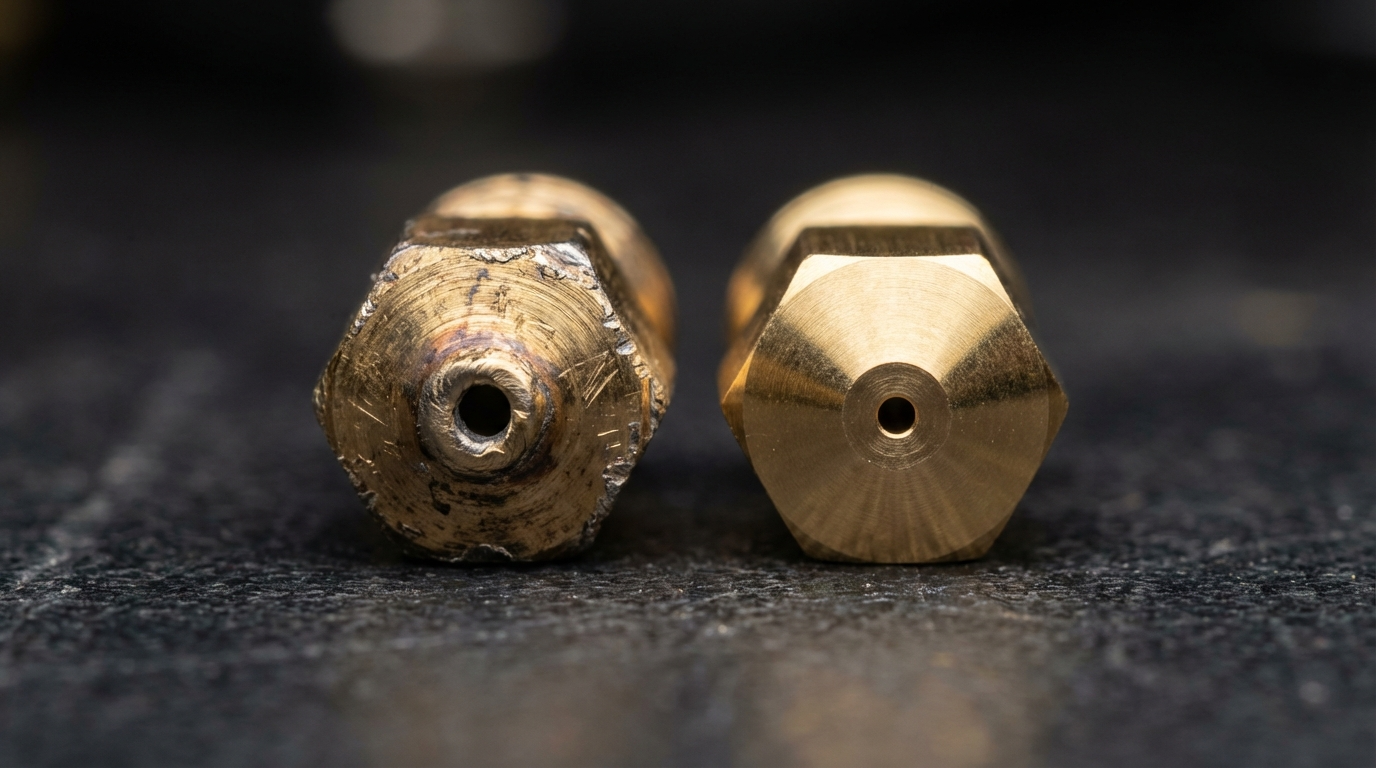
Remove the nozzle and examine the tip. A new nozzle has a flat, even surface around the bore. A worn nozzle might show:
- A crater or depression around the hole
- An oblong or irregular hole shape
- Scratches or grooves on the flat tip surface
- The hole visibly larger than spec
7. The Paper Test Fails
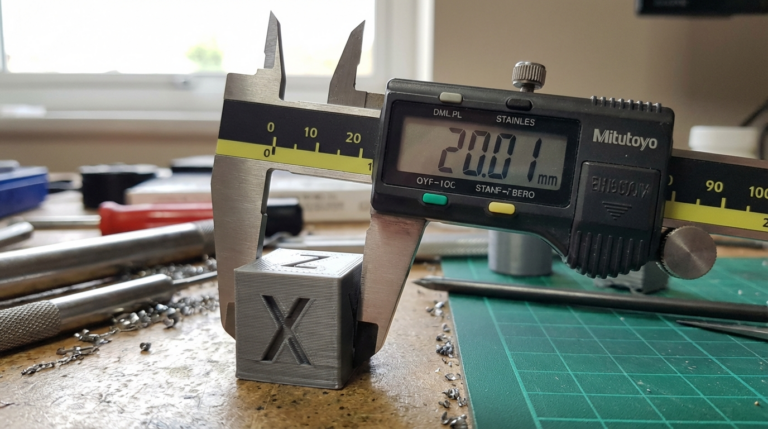
Here’s a quick test: extrude a short length of filament into the air and measure its diameter with calipers. A 0.4 mm nozzle should produce a strand close to 0.4 mm. If it’s consistently 0.5 mm or larger, the nozzle is worn.
Nozzle Materials Compared
Brass (Standard)
- Cost: $1–3 per nozzle
- Thermal conductivity: Excellent (best heat transfer)
- Wear resistance: Low (soft metal, Mohs hardness ~3)
- Best for: PLA, ABS, ASA, PETG, TPU — any non-abrasive filament
- Lifespan: 200–500 print hours with standard filaments, can be as low as 5–10 hours with abrasive filaments
Brass is the default for a reason: it’s cheap, conducts heat well, and works perfectly for the majority of printing. If you only print standard filaments, brass is fine — just keep a few spares on hand.
Hardened Steel
- Cost: $8–20 per nozzle
- Thermal conductivity: Poor (40% lower than brass)
- Wear resistance: Very high (Mohs hardness ~7–8)
- Best for: Carbon fiber, glass fiber, glow-in-the-dark, metal-filled filaments
- Lifespan: 1,000+ print hours even with abrasive filaments
Hardened steel nozzles are the go-to choice for abrasive filaments. They last practically forever with standard materials and handle the toughest filaments without issues. The trade-off is lower thermal conductivity — you may need to print 5–10°C hotter and slightly slower to compensate.
Hardened Steel with Nickel/Copper Plating
- Cost: $15–30 per nozzle
- Thermal conductivity: Good (better than plain hardened steel)
- Wear resistance: Very high
- Best for: All filaments — the best all-rounder
- Lifespan: 1,000+ hours
Nozzles like the Bondtech CHT or E3D ObXidian combine a hardened steel core with a copper or nickel coating. The coating improves thermal conductivity while maintaining wear resistance. These are the “install and forget” option — great for users who switch between standard and abrasive filaments.
Ruby-Tipped
- Cost: $80–100 per nozzle
- Thermal conductivity: Good (brass body with ruby insert)
- Wear resistance: Exceptional (Mohs hardness 9, second only to diamond)
- Best for: Heavy abrasive filament users who want maximum longevity
- Lifespan: Thousands of hours
The Olsson Ruby and similar nozzles use a brass body (for good thermal conductivity) with a synthetic ruby insert at the tip (for extreme wear resistance). They’re expensive, but for print farms running abrasive filaments continuously, they can actually save money over time.
Tungsten Carbide
- Cost: $25–50 per nozzle
- Thermal conductivity: Moderate
- Wear resistance: Exceptional
- Best for: Industrial users, continuous abrasive filament printing
- Lifespan: 2,000+ hours
How to Choose the Right Nozzle
Here’s a simple decision framework:
- Only print PLA, PETG, ABS, TPU? → Brass is fine. Buy a pack of 10 for $5 and replace as needed.
- Occasionally print CF, GF, or glow-in-the-dark? → Get a hardened steel nozzle for those jobs, keep brass for standard filaments.
- Frequently switch between standard and abrasive? → Invest in a nickel-plated hardened steel nozzle as your daily driver.
- Print abrasive filaments all day long? → Ruby-tipped or tungsten carbide for maximum longevity.
How to Replace a Nozzle Safely
- Heat the hotend to printing temperature (this softens any filament inside)
- Use a wrench (usually 6 mm for E3D-style nozzles) to unscrew the old nozzle. Hold the heater block steady with a second wrench.
- Inspect the old nozzle — check for wear signs mentioned above
- Screw in the new nozzle — finger-tight first, then snug with the wrench. Do not over-tighten (you’ll strip the threads)
- Hot-tighten: Heat to temperature, then give it a final quarter-turn to ensure a seal against the heatbreak. This prevents filament from leaking between the nozzle and heatbreak.
Critical: Always hot-tighten. A nozzle that’s cold-tightened only will develop a gap at printing temperature due to thermal expansion, causing filament leaks.
Maintenance Tips to Extend Nozzle Life
- Use brass cleaning needles: Never use hardened steel needles on a brass nozzle — they’ll enlarge the bore
- Cold pulls regularly: This cleans the inside of the nozzle without mechanical abrasion
- Don’t print with the nozzle scraping the bed: Set your Z-offset properly to avoid grinding the nozzle tip on the bed surface
- Keep your filament clean: Dust and debris on the filament path contribute to wear. Use a filament dust filter or wiper.
- Switch nozzles for abrasive filaments: If you mainly print PLA but occasionally use CF, swap to a hardened steel nozzle for those jobs rather than destroying your brass nozzle
The Bottom Line
Nozzle wear is real, predictable, and easy to manage once you’re aware of it. Keep a few spare nozzles in your toolkit, learn the signs of wear, and match your nozzle material to the filaments you print. It’s one of the cheapest and simplest maintenance tasks in 3D printing — and ignoring it causes some of the most frustrating quality problems you’ll encounter.