Tree Supports vs Normal Supports in Cura: Complete Comparison
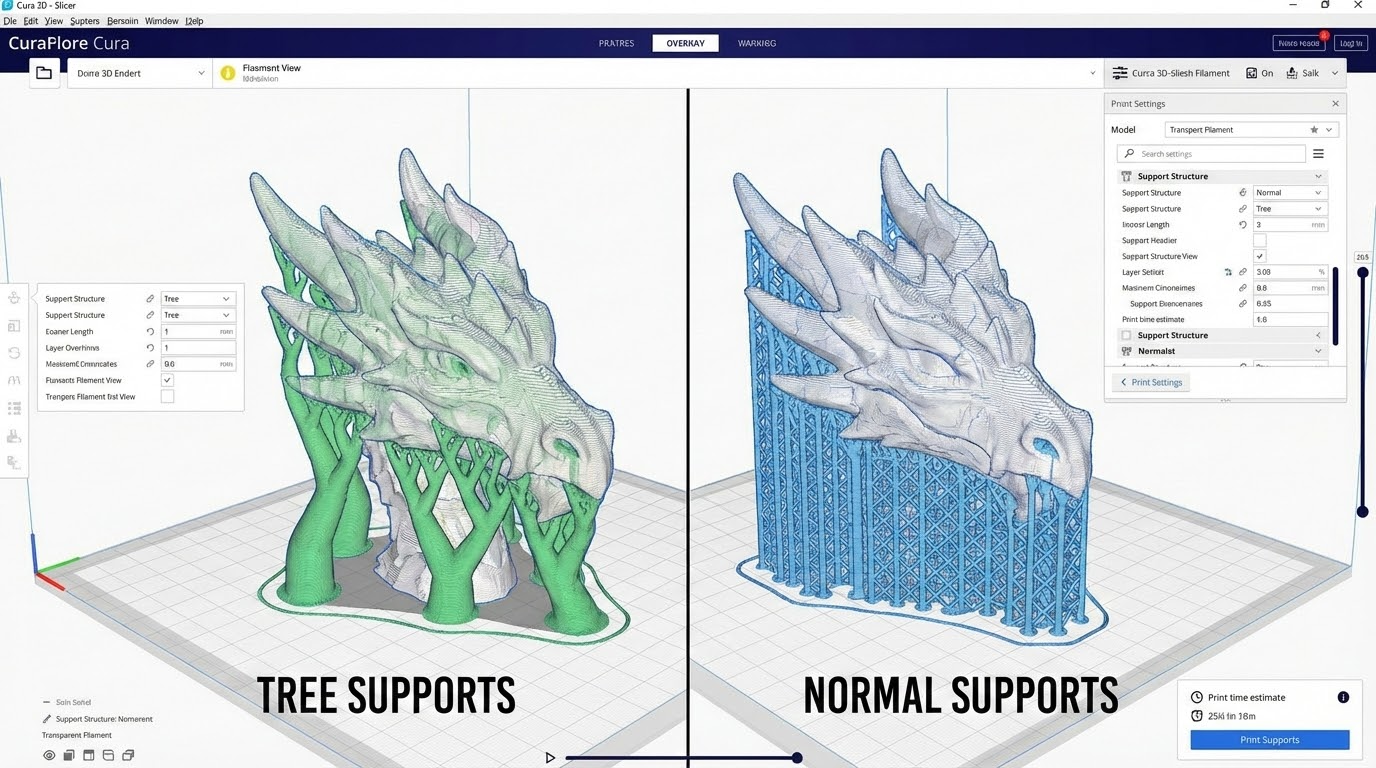
If you’ve ever scrolled through Cura’s support settings, you’ve probably noticed two fundamentally different approaches: the classic “Normal” supports that build up in straight columns, and the newer “Tree” supports that branch out like organic structures to reach overhangs from the side. Both do the same job — holding up overhangs during printing — but they do it in dramatically different ways.
After printing with both types extensively across dozens of models, I’ve developed strong opinions about when each one shines and when it falls flat. Here’s a practical, no-fluff comparison to help you pick the right support type for your next print.
How Normal Supports Work
Normal supports (also called “linear” or “block” supports) are the traditional approach. The slicer identifies any overhang steeper than a threshold angle (usually 45-50°), then generates support material directly below that overhang, building straight up from the build plate or from a lower surface of the model.
Think of it like scaffolding on a building — vertical columns with a flat top that reaches right up to the underside of the overhang. The support pattern (lines, zigzag, or grid) fills the column cross-section, and an interface layer at the top creates the actual contact surface with your print.
Structure: Vertical columns rising from the build plate or model surface directly below overhangs.
Contact: Horizontal interface at the top of each support column, covering the full area of the overhang.
Removal: Break or peel away from the interface layer. Contact area is typically large.
How Tree Supports Work
Tree supports take a fundamentally different approach. Instead of building straight up beneath an overhang, they grow trunk-like structures from the build plate that branch outward as they rise, reaching the overhang from the side. The branches bend and split to contact multiple overhang points from a single trunk.
The result looks organic — almost like roots or coral growing up around your model. It’s visually interesting, but the design is functional: by approaching overhangs from the side and below rather than directly underneath, tree supports can often avoid touching the model’s outer surfaces entirely.

Structure: Central trunks that branch outward, approaching overhangs from angles.
Contact: Small branch tips contact the overhang at specific points rather than across the full area.
Removal: Often peels away in large connected pieces. Contact points are fewer and smaller.
Print Quality Comparison
Overhang Surface Quality
This is where tree supports earn their reputation. Because tree branches contact the overhang at discrete points rather than across a continuous interface, the supported surface often looks significantly better after support removal.
With normal supports, you get the characteristic “support interface” texture across the entire overhang — a rough, slightly pitted surface where the support contacted the print. Even with optimized Z distance and interface density, this texture is always present and always visible.
With tree supports, you get small contact marks only where branch tips touched the print. The areas between contact points are essentially unsupported bridging, which — if the spacing is right — produces a relatively clean surface. The overall effect is fewer but more noticeable individual marks versus a uniform roughness across the entire surface.
Winner: Tree supports for visible surfaces, especially on organic models (figurines, sculptures, decorative pieces). Normal supports for functional parts where surface texture doesn’t matter.
Dimensional Accuracy
Normal supports provide more consistent support across the full overhang area, which means the overhang sags less during printing. For engineering parts with tight tolerances on overhung surfaces, this uniform support produces more predictable dimensional results.
Tree supports’ point-contact approach means some minor sagging between branch tips is inevitable. For most prints, this is imperceptible (fractions of a millimeter), but for precision parts, it can push dimensions out of tolerance.
Winner: Normal supports for dimensional accuracy. The continuous interface provides more reliable support for flat overhung surfaces.
Material Usage
Tree supports typically use 20-40% less material than normal supports for the same model. The savings come from the branching structure — instead of filling entire columns with support material, trees grow efficient paths from the build plate to the overhang points.
The difference is most dramatic on tall models with overhangs near the top. A normal support might build a full column from the build plate all the way up, while a tree support grows a thin trunk and only branches near the overhang level.

For models with internal overhangs or overhangs above other parts of the model, tree supports can sometimes route around obstacles and reach from the build plate, avoiding the need for supports-on-model entirely. Normal supports would need to build directly on the model surface below.
Winner: Tree supports, often by a significant margin. If filament cost matters to you, tree supports will save money over time.
Print Time
Less material generally means less print time, so tree supports tend to be faster — but not always. The branching geometry requires more complex toolpath planning, which can introduce more travel moves and retractions. On some models, the time savings from less material are partially offset by the more complex printing pattern.
In my testing, tree supports averaged about 15-25% faster print times compared to normal supports on models with moderate overhangs. On models with extensive overhangs, the time savings can reach 30-40% because the material savings are so substantial.
Winner: Tree supports in most cases. The material savings translate directly to time savings.
Ease of Removal
This is where opinions get strong — and where the difference is most noticeable in daily use.
Normal Support Removal
Normal supports have large interface areas bonded to the print. Removing them requires breaking this bond across the entire contact surface. For large overhangs, this can require significant force, and there’s always a risk of damaging the print surface. The interface leaves a consistent rough texture that needs sanding or other post-processing.
On the positive side, normal supports are predictable. You know where they contact the model, the removal force is consistent, and with proper Z distance settings, the break is clean even if the surface isn’t pretty.
Tree Support Removal
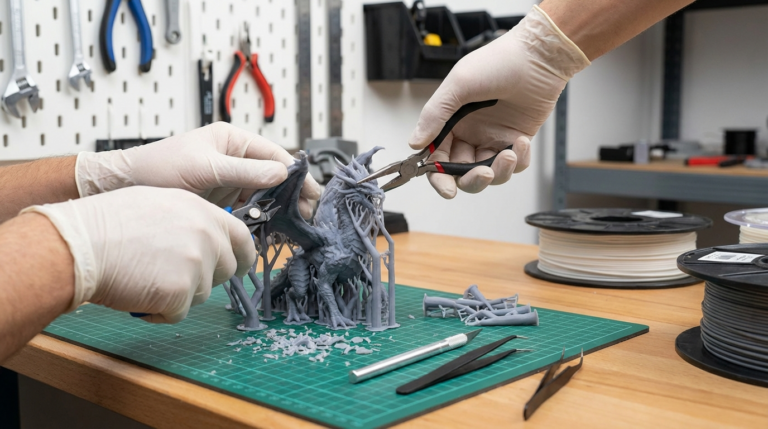
Tree supports often come off in one satisfying piece. Because the branch structure is connected, you can grip the trunk and peel the entire support away from the model. The point contacts at branch tips usually break cleanly with minimal force.
The removal experience with tree supports is generally faster and more satisfying. Less force is needed, less post-processing is required, and the risk of print damage during removal is lower because you’re applying force at small, distributed points rather than across a large bonded area.
However, tree supports can occasionally trap themselves inside concavities or internal features where branches grew through openings. In these cases, removal requires more careful work with pliers or picks to extract branches from tight spaces.
Winner: Tree supports for most models. The single-piece removal and smaller contact points make for a faster, cleaner experience.
When to Use Normal Supports
Despite tree supports’ advantages in many areas, normal supports remain the better choice in several scenarios:
Large, flat overhangs: If your model has a wide, flat overhang (like a ceiling or shelf), normal supports provide uniform coverage that prevents sagging. Tree support tips may not space closely enough to prevent visible drooping on large flat areas.
Engineering tolerances: When dimensional accuracy on overhung surfaces matters more than surface finish, normal supports’ continuous interface is more reliable.
Simple geometries: For basic shapes with straightforward overhangs, normal supports are simpler and more predictable. Tree supports are solving a problem that doesn’t need solving on a simple 45° overhang on a box.
Slicer compatibility: Not all slicers implement tree supports equally well. Cura’s implementation is mature, but some other slicers’ tree algorithms are still developing and may produce unreliable results. PrusaSlicer calls them “organic supports” and their implementation differs slightly from Cura’s.
Faster slicing: Tree support generation takes significantly longer in the slicer — sometimes minutes versus seconds for normal supports on complex models. If you’re iterating quickly on designs and re-slicing frequently, this adds up.
When to Use Tree Supports
Tree supports excel in these situations:
Organic models: Figurines, sculptures, character models — anything with complex curved surfaces and multiple overhangs at various angles. Tree supports navigate around these geometries elegantly, often avoiding visible surface contact entirely.
Visible overhang surfaces: When the supported surface will be visible in the final product, tree supports’ smaller contact marks are preferable to normal supports’ full-interface texture.
Material savings priority: For large prints where support material represents a significant portion of total filament use, tree supports’ efficiency directly reduces cost.
Models with internal features: Tree supports can route around internal geometry more creatively than normal supports, sometimes reaching overhangs that normal supports would need to build on top of the model to reach.
Detailed models: Miniatures, jewelry, or any print with fine features benefit from tree supports’ targeted, minimal-contact approach.
Optimal Settings for Each Type
Normal Support Settings (Cura)
Support pattern: Lines (easiest removal) or Zigzag (for sheet removal)
Support density: 10-15% (enough stability, easy removal)
Support interface: Enabled, 60-75% density, 2 layers
Support Z distance: 1-1.5x layer height
Support angle: 45-50° (default is fine for most cases)
Tree Support Settings (Cura)
Branch angle: 40-50° (lower = more vertical, more stable; higher = wider reach, fewer trunks)
Branch diameter: 2-3mm (thinner = easier removal, less stable; thicker = more reliable)
Branch spacing: Affects density of branches contacting the overhang. Default usually works well
Support interface: Optional. Enable for better overhang quality; disable for easiest removal
Collision resolution: 0.2-0.3mm (prevents branches from growing too close to the model)
The Verdict
There’s no universal “better” option — both support types exist because they solve different problems optimally.
Default to tree supports if you print mostly organic models, display pieces, or anything where the overhang surface will be visible. You’ll save material, spend less time on removal, and get better-looking results in most cases.
Default to normal supports if you print mostly functional or engineering parts where dimensional accuracy matters, or models with large flat overhangs. The predictable, uniform support is more reliable for precision work.
Use both on the same model — Cura allows you to place support enforcers and blockers to mix approaches on different sections of a single print. Put normal supports under that critical flat overhang, and let tree supports handle the organic bits elsewhere.
The real power comes from understanding what each type does well and choosing deliberately rather than defaulting to whatever your slicer set last time you printed. Matching support type to model geometry is one of those intermediate skills that quietly improves every print you make.