Best All-Metal Hotend Upgrades for 3D Printers in 2025
Why Upgrade to an All-Metal Hotend?
Every FDM 3D printer ships with a hotend — the component that melts filament and deposits it layer by layer. Budget printers typically use a PTFE-lined hotend where a Teflon tube runs all the way down to the nozzle. This works fine for PLA and basic PETG, but it creates a hard ceiling: PTFE starts degrading around 240°C and releases toxic fumes above 260°C. If you want to print high-temperature materials like nylon, polycarbonate, ASA, or carbon fiber composites, you need an all-metal hotend.
An all-metal hotend replaces the PTFE liner with a metal heatbreak — usually titanium or stainless steel — that creates a thermal barrier between the cold zone and hot zone without any plastic components in the melt path. This lets you safely print at temperatures up to 300°C or higher, dramatically expanding your material options.
But temperature range isn’t the only benefit. All-metal hotends also tend to be more durable, produce more consistent extrusion over long prints, and eliminate the need to periodically replace degraded PTFE tubes. The tradeoff? They can be slightly more prone to clogs with PLA if not properly tuned, and they require a bit more attention to retraction settings.
How an All-Metal Hotend Works
To understand why this upgrade matters, let’s break down the anatomy of a hotend:
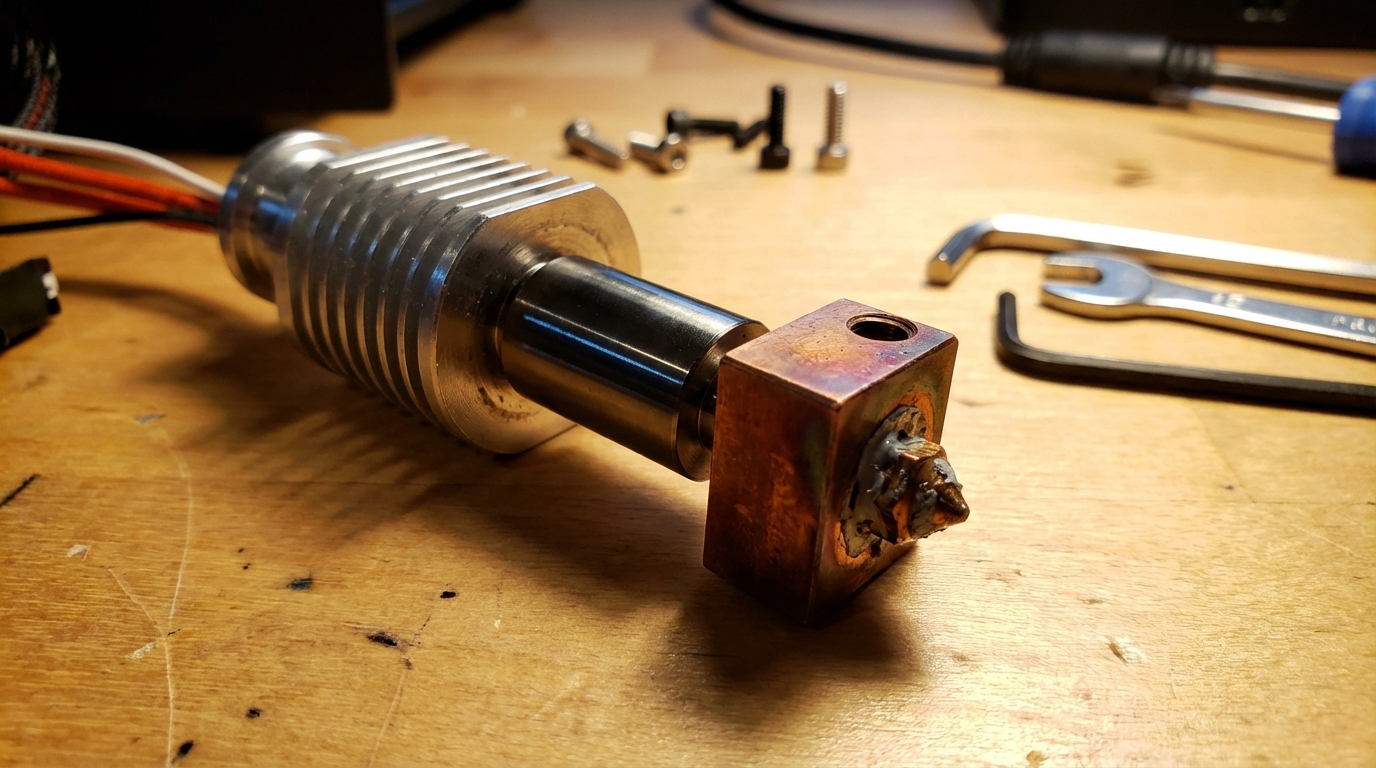
The Heat Block
This aluminum (or sometimes copper) block houses the heating element and thermistor. It’s where filament reaches its melting temperature. In both PTFE-lined and all-metal hotends, the heat block functions similarly. Some aftermarket options use copper or plated copper for better heat transfer and thermal stability.
The Heatbreak
This is the critical component that differentiates all-metal from PTFE-lined hotends. The heatbreak is a narrow tube that connects the heat block to the heat sink. In a PTFE hotend, a Teflon tube runs through this section. In an all-metal hotend, the heatbreak itself creates the thermal transition — typically through a very thin-walled section that limits heat transfer upward.
Titanium alloy (Ti6Al4V) is the gold standard for heatbreaks because titanium has extremely low thermal conductivity compared to steel — about 7 W/mK versus 16 W/mK for stainless steel. This creates a sharper thermal gradient, which means the filament transitions from solid to liquid over a shorter distance. The result is less heat creep and better retraction performance.
The Heat Sink
The finned aluminum block (or cylinder) above the heatbreak dissipates heat away from the cold zone. A fan blows air across these fins to keep the upper portion of the filament path cool. In an all-metal setup, adequate cooling of the heat sink becomes even more important because there’s no PTFE buffer to insulate against heat creep.
Best All-Metal Hotend Upgrades in 2025
The aftermarket hotend landscape has exploded in recent years. Here are the top options across different budgets and printer types:
Slice Engineering Mosquito
The Mosquito revolutionized hotend design with its tool-less nozzle change system and compact form factor. It uses a two-piece heatbreak that creates an excellent thermal gradient, and nozzle swaps take about 60 seconds without any tools. The Mosquito handles temperatures up to 500°C with the right components, making it overkill for most users but an absolute tank for high-temperature engineering filaments.
Price: $155-175 | Max Temp: 500°C | Best For: Enthusiasts who want premium quality and frequent nozzle changes
E3D Revo System
E3D took a different approach with the Revo: instead of separating the nozzle from the heatbreak, they combined them into a single “RapidChange” unit. You swap the entire nozzle-heatbreak assembly by hand — no tools, no hot tightening, no risk of leaks between nozzle and heatbreak. The Revo ecosystem now includes versions for most popular printers.
Price: $60-90 | Max Temp: 300°C | Best For: Users who want hassle-free nozzle changes and reliable performance
Micro Swiss All-Metal Hotend
Micro Swiss makes drop-in all-metal hotend kits specifically designed for popular printers like the Ender 3, CR-10, and Prusa i3 series. Their plated copper heat block and thermal barrier tube provide excellent performance at a moderate price. Installation is straightforward since the kits are designed to fit existing mounting hardware.
Price: $40-65 | Max Temp: 300°C | Best For: Ender 3 and CR-10 owners looking for a straightforward upgrade
TriangleLab Dragon Hotend
The Dragon (and its successor the Dragon Ace) offers Mosquito-level performance at about half the price. It features a bi-metal titanium-copper heatbreak that combines titanium’s low conductivity with copper’s excellent heat transfer in the melt zone. The Dragon has become the go-to recommendation for Voron and other custom printer builds.
Price: $35-55 | Max Temp: 500°C | Best For: Custom builds and budget-conscious enthusiasts
Bambu Lab Hotend (Stock on X1/P1 Series)
If you own a Bambu Lab printer, you already have an all-metal hotend. The stock Bambu hotend is excellent, featuring a bi-metal heatbreak and ceramic heater. Replacement hotend assemblies cost around $20-30, and Bambu’s quick-swap design makes maintenance a non-issue. No upgrade needed here — just worth noting that Bambu got this right from the factory.
Installation Guide: Upgrading Your Ender 3
The Ender 3 series is the most common printer that benefits from an all-metal hotend upgrade. Here’s a general walkthrough using a Micro Swiss kit as an example:
Tools You’ll Need
- 2mm and 2.5mm hex wrenches (Allen keys)
- 7mm wrench or socket for the nozzle
- Small adjustable wrench
- Thermal compound (optional but recommended)
- Needle-nose pliers
Step-by-Step Process
- Heat the hotend to 200°C and remove the filament. Let it cool completely before proceeding.
- Power off the printer and unplug it. Remove the silicone sock and fan shroud to access the hotend assembly.
- Remove the nozzle while the hotend is still warm (reheat to ~180°C if needed). Use a wrench to unscrew the nozzle from the heat block.
- Disconnect the heater cartridge and thermistor wires. Note which connector goes where — take a photo before disconnecting.
- Remove the heat block by unscrewing the grub screw that holds the old heatbreak in the block.
- Remove the old heatbreak and PTFE tube from the heat sink. The PTFE tube usually pulls out once you release the pneumatic fitting.
- Install the new all-metal heatbreak into the heat sink. Hand-tighten it, then use a wrench for about a quarter turn more. Don’t over-tighten.
- Attach the new heat block to the heatbreak. The heatbreak should protrude slightly into the heat block, with the nozzle butting up against it when fully tightened.
- Install the heater cartridge and thermistor into the new heat block. Apply a tiny amount of thermal compound to the thermistor.
- Install the new nozzle. Heat the hotend to 250°C, then tighten the nozzle firmly against the heatbreak. This “hot tightening” step is critical — it prevents filament leaks between the nozzle and heatbreak.
- Reassemble the fan shroud and run a PID autotune since the thermal characteristics have changed.
Post-Upgrade Settings You Need to Change
Dropping in an all-metal hotend and using your old settings is a recipe for clogs. Here’s what to adjust:
Retraction Distance
This is the biggest change. With a PTFE-lined hotend, you might have retraction set to 5-7mm. With an all-metal hotend, reduce this to 1-3mm for direct drive or 3-5mm for Bowden setups. Too much retraction in an all-metal hotend pulls molten filament into the cold zone, where it solidifies and causes a clog.
Retraction Speed
Keep retraction speed moderate — around 25-45mm/s. Too fast can cause grinding; too slow increases stringing. Start at 35mm/s and adjust based on results.
Print Temperature
All-metal hotends often need slightly higher temperatures (5-10°C) compared to PTFE-lined ones because the thermal profile is different. If you were printing PLA at 200°C, try 205-210°C. Print a temperature tower with your new hotend to find the sweet spot.
PID Autotune
Different heat block materials and heater positions mean your old PID values won’t work well. Run a PID autotune from your printer’s menu or via terminal command: M303 E0 S210 C8 (for a target of 210°C, 8 cycles). Save the results with M500.
Dealing with PLA Clogs in All-Metal Hotends
PLA is notoriously finicky in all-metal hotends. The issue is that PLA has a relatively narrow transition zone between solid and liquid states, and without the slippery PTFE liner, it can stick to the metal walls of the heatbreak and create a plug. Here’s how to prevent this:
- Reduce retraction aggressively — Even 0.5mm too much retraction can cause clogs with PLA. Start at 1mm for direct drive and increase only if stringing is unacceptable.
- Print slightly hotter — 210-215°C helps PLA flow more smoothly through the all-metal path.
- Ensure your heat sink fan is always running — Heat creep is the enemy. The fan that cools the heat sink (not the part cooling fan) should run at 100% whenever the hotend is above 50°C.
- Use a bi-metal heatbreak — Titanium-copper bi-metal heatbreaks have the sharpest thermal gradient and are the least prone to PLA clogs.
- Consider a coated heatbreak — Some manufacturers offer nickel or TiN-coated heatbreaks that reduce filament adhesion inside the melt zone.
Is an All-Metal Hotend Worth It?
If you only print PLA and don’t plan to change that, honestly, probably not. A PTFE-lined hotend handles PLA beautifully, is more forgiving with retraction settings, and costs nothing to keep using. The PTFE tube needs replacement every few months, but that’s a $2 part and a 10-minute job.
But if any of these apply to you, an all-metal hotend is practically mandatory:
- You want to print PETG above 240°C, ABS, ASA, nylon, polycarbonate, or carbon fiber composites
- You’re tired of replacing PTFE tubes and worrying about degradation
- You’re building a printer from scratch or doing a major overhaul
- You want the peace of mind that your hotend can handle any filament without modification
For most 3D printing enthusiasts who’ve graduated beyond basic PLA, an all-metal hotend is the single best upgrade you can make. It unlocks an entire world of engineering-grade materials and eliminates a common maintenance headache. Just remember to adjust your retraction settings, and you’ll be printing better than ever within an hour of installation.