How to Clean Your PEI 3D Printer Bed: The Complete Guide
Your PEI print bed is the unsung hero of every successful 3D print. When it’s clean, parts stick perfectly on the first try. When it’s not, you’re dealing with warped corners, failed first layers, and hours of wasted filament. The good news? Keeping your PEI sheet in top shape is straightforward once you know what works — and what doesn’t.
In this guide, I’ll walk you through everything you need to know about cleaning and maintaining your PEI print bed, from daily quick wipes to deep restoration techniques that can bring even the most neglected sheets back to life.
Why PEI Beds Need Regular Cleaning
PEI (polyetherimide) sheets work because of their surface chemistry — the material naturally bonds with common 3D printing filaments at elevated temperatures. But every time you touch the bed, handle a print, or even just let the printer sit idle, contaminants build up on the surface.
Fingerprint oils are the biggest culprit. The natural oils from your skin create a thin hydrophobic layer that prevents filament from bonding properly. Dust, filament residue, and adhesive remnants from tape or glue stick also accumulate over time.

The tricky part is that contamination builds gradually. Your first 20 or 30 prints might stick perfectly, leading you to think cleaning doesn’t matter. Then adhesion starts failing seemingly overnight. It’s not that your PEI sheet wore out — it’s that the accumulated grime finally reached a critical threshold.
Daily Cleaning: The Quick IPA Wipe
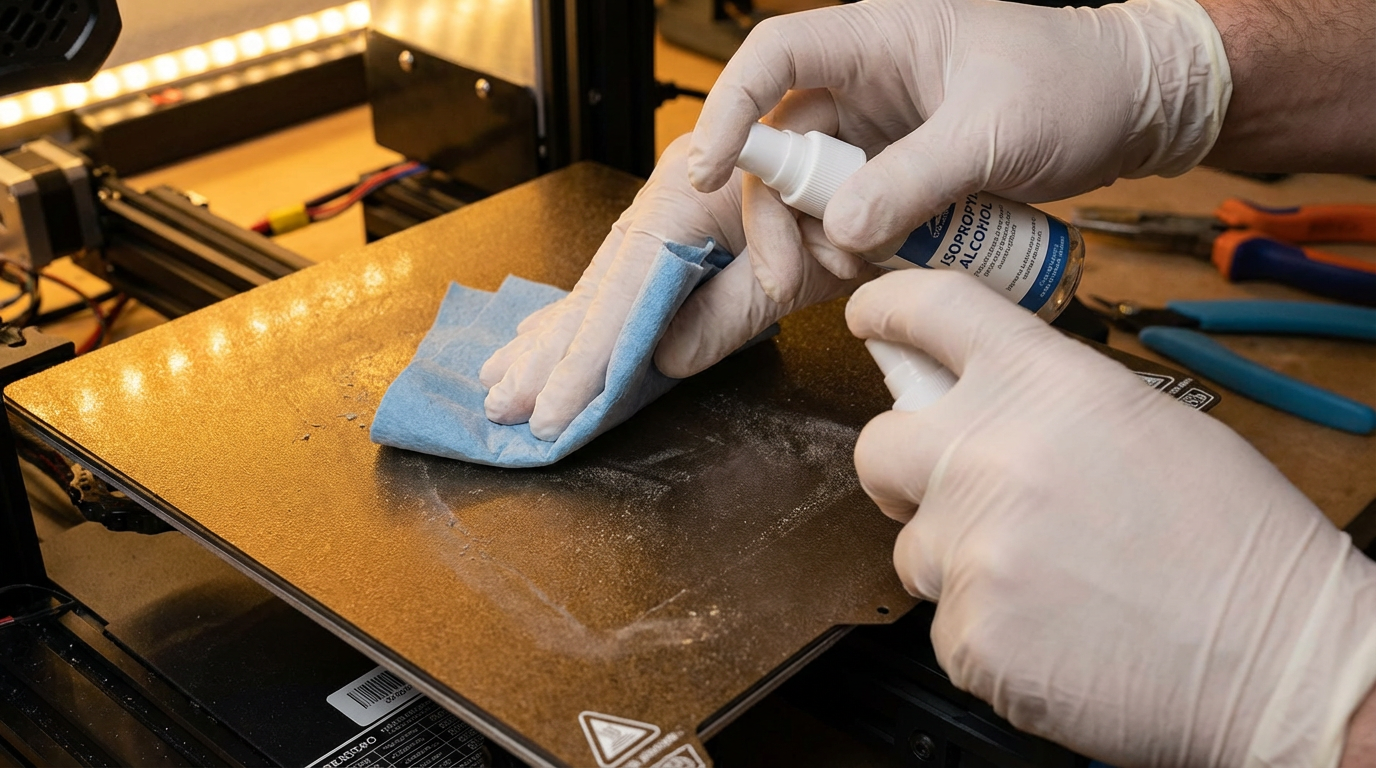
For routine maintenance between prints, isopropyl alcohol (IPA) is your best friend. Here’s the proper technique:
- Use 90% or higher concentration IPA. Lower concentrations contain more water and leave residue behind. 99% is ideal, but 91% works fine for daily use.
- Apply to a lint-free cloth or paper towel. Don’t spray directly onto the bed — you risk getting alcohol into the printer’s electronics.
- Wipe in one direction. Back-and-forth scrubbing just redistributes the oils. Single-direction passes pick up contaminants and remove them.
- Let it evaporate completely before starting your next print. This takes about 30 seconds at room temperature.
One important note: don’t touch the bed surface after cleaning. Even a quick finger placement to check if it’s dry will deposit oils right back where you just cleaned.
Weekly Deep Clean: Dish Soap and Warm Water
IPA is great at removing oils, but it doesn’t dissolve everything. Filament residue, adhesive buildup, and stubborn contamination need a more thorough approach. Once a week (or whenever adhesion starts declining despite IPA wipes), do a proper wash.
Remove the PEI sheet from your printer if possible. Most modern printers use magnetic flex plates that pop right off. Then:
- Run warm (not hot) water over the sheet.
- Apply a small amount of unscented dish soap — Dawn or similar works perfectly.
- Use your fingers or a soft sponge to gently scrub the entire surface.
- Rinse thoroughly under running water until all soap is gone.
- Pat dry with a clean paper towel or let air dry.
The key word here is unscented. Scented soaps often contain moisturizers and oils that will coat your PEI sheet and make adhesion worse, not better. Plain blue Dawn is the gold standard in the 3D printing community for a reason.

The Nuclear Option: Acetone Treatment
If IPA wipes and soap washes aren’t restoring adhesion, it’s time to break out the acetone. This is the heavy-duty cleaning method that strips away everything — oils, residue, and even light surface oxidation.
Important warnings before you start:
- Acetone is only safe for smooth PEI sheets. Never use acetone on textured PEI — it will damage the surface texture permanently.
- Work in a well-ventilated area. Acetone fumes are no joke.
- Use acetone sparingly. A little goes a long way.
Apply a small amount of acetone to a paper towel and wipe the smooth PEI surface. You’ll likely see a yellowish or brownish tint on the towel — that’s accumulated contamination being dissolved. Follow up with an IPA wipe to remove any acetone residue, then let everything dry completely.
Most users find that an acetone treatment every 2-4 weeks keeps their smooth PEI sheets performing like new. If you’re printing daily, you might need to do it more frequently.
Restoring a Damaged PEI Sheet
Sometimes cleaning isn’t enough. If your PEI sheet has visible scratches, gouges from aggressive print removal, or areas where adhesion is permanently compromised, you have a few options:
Light sanding: For smooth PEI sheets with surface contamination that won’t come off, fine-grit sandpaper (2000-3000 grit) can remove the top layer and expose fresh PEI underneath. Sand in circular motions with light pressure, then clean thoroughly with IPA.
Steel wool treatment: Extra-fine steel wool (0000 grade) works similarly to sandpaper but is gentler. It’s particularly good for removing stubborn adhesive residue from tape or glue stick.
Replacement: PEI sheets are consumable items. If your sheet is heavily damaged, warped, or more than a year old with heavy use, replacing it is often the most cost-effective solution. A new sheet costs $15-30 and will give you months of perfect adhesion.
Common Mistakes That Damage PEI Sheets
Knowing what not to do is just as important as knowing the proper cleaning techniques:
- Using a metal scraper aggressively. Metal spatulas can gouge PEI surfaces. Use a flexible plastic scraper or let prints cool completely before removal — thermal contraction usually pops them right off.
- Printing too close to the bed. A z-offset that’s too low forces filament into the PEI surface, causing it to bond too strongly. This leads to surface damage when you remove the print.
- Heating an empty bed for extended periods. While PEI handles heat well, prolonged heating without a print can cause thermal degradation over time. Don’t leave your heated bed running when not printing.
- Using adhesive products unnecessarily. Glue stick or hairspray on PEI creates buildup that’s hard to remove and often reduces adhesion rather than improving it. PEI works best when it’s clean and bare.
- Cleaning with window cleaner or household cleaners. Many contain silicone or wax-based ingredients that coat the PEI surface and create a barrier against filament adhesion.
PEI Cleaning Schedule: What Actually Works
After years of testing and thousands of prints, here’s the maintenance schedule I recommend:
- Before every print: Quick IPA wipe with 90%+ isopropyl alcohol
- Once a week: Warm water and unscented dish soap wash
- Every 2-4 weeks: Acetone treatment (smooth PEI only)
- Every 3-6 months: Inspect for damage, consider light sanding or replacement
This schedule assumes moderate use (1-2 prints per day). Heavy users may need to increase frequency, while occasional printers can stretch intervals longer.
Smooth vs. Textured PEI: Different Care Approaches
Smooth and textured PEI sheets have different cleaning requirements that are worth understanding:
Smooth PEI provides the strongest adhesion and leaves a glossy bottom surface on prints. It’s more sensitive to contamination but can be aggressively cleaned with acetone and sanding. Best for PLA and materials that tend to warp.
Textured PEI offers easier print removal and a matte finish on the bottom of prints. The texture traps some contaminants but also makes them harder to remove. Stick to IPA and soap only — no acetone, no sanding. The texture is a surface treatment that can be permanently damaged by aggressive cleaning.
Many experienced printers keep both types on hand: smooth PEI for critical prints that need maximum adhesion, and textured PEI for everyday prints where easy removal matters more.
Filament-Specific Tips
Different materials interact differently with PEI, and your cleaning approach should account for this:
- PLA: Sticks well to clean PEI at 55-60°C. Clean bed is usually all you need.
- PETG: Can bond too well to bare PEI and damage the sheet on removal. Apply a thin layer of glue stick as a release agent, or use textured PEI.
- ABS: Requires higher bed temps (100-110°C). Acetone cleaning before ABS prints improves adhesion significantly.
- TPU: Flexible filaments generally release easily from PEI. Standard IPA cleaning is sufficient.
- Nylon: Notoriously difficult adhesion. Use glue stick on PEI for nylon, and clean with soap and water between prints.
Final Thoughts
A well-maintained PEI bed eliminates one of the most common sources of 3D printing frustration: first layer adhesion failures. The cleaning routine takes less than a minute for daily maintenance, and the payoff is dramatically improved print reliability.
The most important takeaway? Don’t wait until prints start failing to clean your bed. Proactive maintenance is always easier than trying to salvage a neglected PEI sheet. Keep that IPA bottle next to your printer, make the quick wipe a habit before every print, and you’ll wonder how you ever managed without it.