CoreXY vs Bed Slinger 3D Printer: Which Architecture Is Right for You?
What Makes These Two Printer Types Different?
If you’re shopping for a 3D printer or considering an upgrade, you’ve probably encountered two fundamentally different machine architectures: “bed slingers” and CoreXY printers. They both melt plastic and stack layers, but they go about it in completely different ways — and those differences have real consequences for print quality, speed, footprint, and what kinds of prints work best.
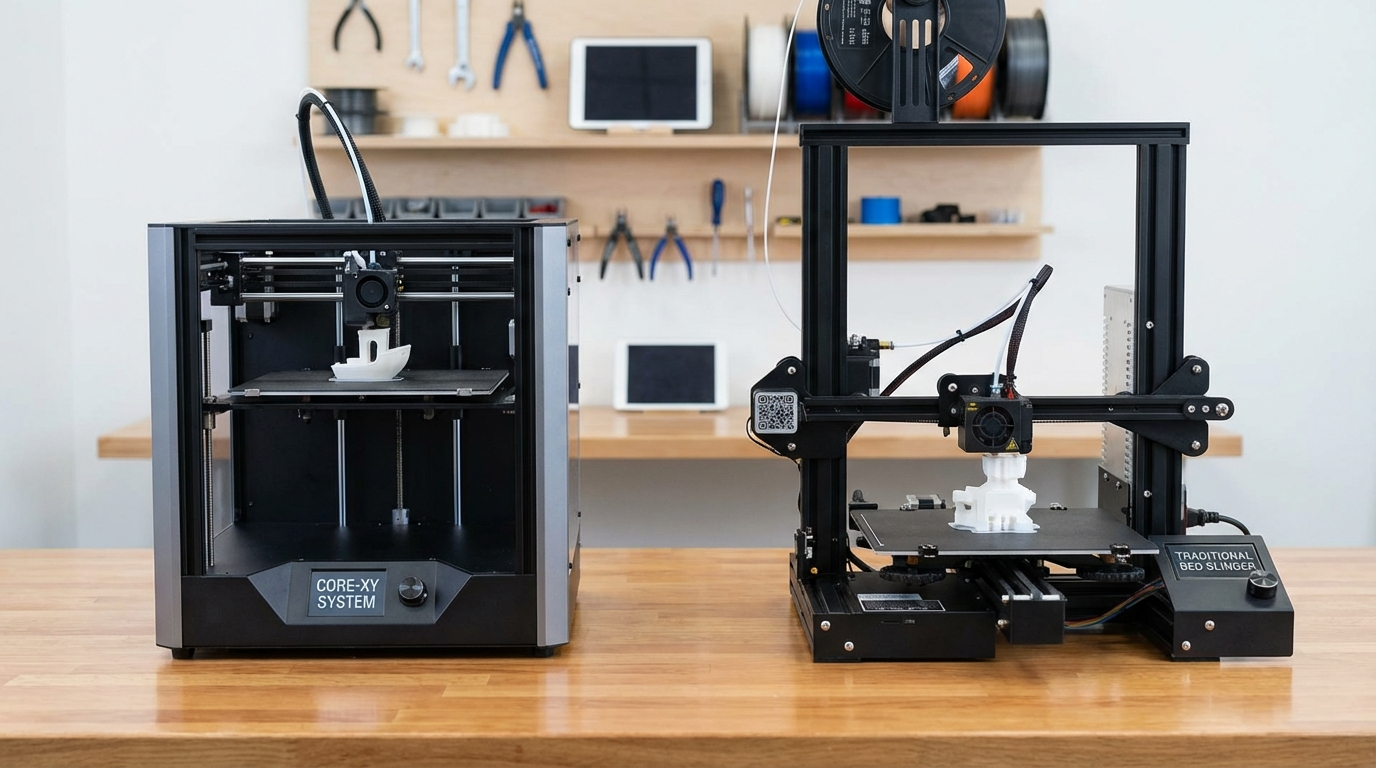
A bed slinger (also called a Cartesian or i3-style printer) moves the print bed back and forth on the Y-axis while the print head moves left-right on the X-axis and up-down on the Z-axis. The Ender 3, Prusa i3, and Artillery Sidewinder are all bed slingers.
A CoreXY printer keeps the bed stationary (or moves it only on the Z-axis) while the print head moves in both X and Y using a belt system. The Voron, Bambu Lab P1S, and RatRig are CoreXY machines.
Neither design is objectively “better.” Each has strengths that matter more in certain situations. This guide will help you understand the tradeoffs and pick the right architecture for how you actually print.
How Bed Slingers Work
The bed slinger design is conceptually simple. The bed sits on linear rails or rods and slides forward and backward (Y-axis) driven by a belt and stepper motor. The print head sits on a horizontal gantry that moves left and right (X-axis), and the entire gantry moves up (Z-axis) one layer height at a time.
This means during printing, the bed is constantly moving — sometimes quite aggressively on fast prints. On a typical Ender 3 printing at 80mm/s, the bed (which weighs 400-600g with the glass/PEI surface) is accelerating and decelerating dozens of times per second.
Advantages of Bed Slingers
- Simple and affordable: Fewer belts, simpler kinematics, cheaper to manufacture. This is why most budget printers are bed slingers
- Easy to build and maintain: The motion system is straightforward. Replacing belts, adjusting tension, and troubleshooting are all simpler
- Open design: Easy access to the print from all sides. Great for monitoring, adding accessories, or removing prints
- Proven technology: Decades of community knowledge, profiles, and mods available
- Large build volume for the price: Scaling up a bed slinger is relatively cheap — you just need longer rails and a bigger bed
Disadvantages of Bed Slingers
- Speed limited by bed mass: The heavy bed creates momentum that fights against direction changes. Faster printing = more force required = more ringing/ghosting artifacts
- Ringing and ghosting: The Y-axis acceleration causes visible artifacts (ripples) on surfaces perpendicular to the bed movement direction
- Tall prints at risk: Tall, narrow parts on a fast-moving bed can wobble, detach, or fail. The bed’s movement creates lateral forces on the print
- Large footprint: The bed needs room to travel forward and backward, so the machine takes up nearly double the bed depth in actual desk space
- Noise: Moving a heavy bed at high speed is inherently louder than moving a lightweight print head
How CoreXY Works
CoreXY uses a pair of long belts routed through a specific path of pulleys so that both stepper motors work together to move the print head in X and Y simultaneously. Neither motor moves the bed, and neither belt handles just one axis. Instead, when both motors turn the same direction, the head moves in one axis; when they turn opposite directions, it moves in the other.
The bed typically only moves in Z (up and down, one layer at a time). Some designs lower the bed; others raise the gantry. Either way, the bed isn’t making rapid movements during printing.
Advantages of CoreXY
- Higher speed potential: The lightweight print head can accelerate much faster than a heavy bed. CoreXY printers routinely print at 200-500mm/s with good quality
- Better print quality at speed: Less mass in motion means less momentum, less ringing, and fewer ghosting artifacts
- Compact footprint: The bed doesn’t move horizontally, so the machine only takes up its own dimensions on the desk. A CoreXY with 250mm build volume fits in a 350mm square
- Better for tall prints: Stationary bed means tall, narrow parts don’t get shaken by bed movement
- Easier to enclose: The cube-shaped frame naturally lends itself to enclosure for ABS/ASA/PC printing
- Quieter at speed: Moving a light head is inherently quieter than slinging a heavy bed
Disadvantages of CoreXY
- More complex: The belt routing is intricate. Building one from a kit (like a Voron) is a multi-day project. Diagnosing belt issues requires understanding the kinematic coupling
- More expensive: The enclosed frame, dual stepper system, and precision required add cost. Budget CoreXY printers exist but still cost more than comparable bed slingers
- Belt path sensitivity: If the belts aren’t routed correctly, have uneven tension, or if pulleys are misaligned, you get dimensional accuracy problems that are harder to diagnose than on a bed slinger
- Harder to access: Enclosed designs make it trickier to reach the print, adjust things mid-print, or modify the machine
- Heavier frame required: The frame needs to be rigid since the print head motion forces are transmitted through the frame rather than absorbed by a heavy moving bed
Speed: The Biggest Difference
Speed is where CoreXY really separates itself from bed slingers. Let’s put some numbers on it.
A typical bed slinger (Ender 3 class) produces good quality prints at 40-80mm/s. You can push to 100-120mm/s with input shaper and careful tuning, but quality degrades noticeably above that due to the bed’s mass creating ringing.
A CoreXY printer (Bambu Lab, Voron class) routinely prints at 200-300mm/s with quality matching what a bed slinger produces at 60mm/s. Some can push to 500mm/s for draft prints. The Bambu Lab X1C, for example, ships with default profiles at 250mm/s.
In practice, this means a print that takes 6 hours on an Ender 3 might finish in 2 hours on a Bambu Lab P1S — same model, comparable quality. For people who print frequently, this time savings adds up fast.
However — and this is important — if you print primarily at conservative speeds (40-60mm/s), a bed slinger produces identical quality to a CoreXY. The speed advantage only matters if you actually use it.
Print Quality: It’s Complicated
At matched speeds, both architectures produce equivalent quality. The difference emerges at higher speeds where the bed slinger’s limitations become visible.
But quality isn’t just about speed artifacts. Consider:
- First layer consistency: Bed slingers have a slight advantage here because the bed is fully supported on rails and easy to level. CoreXY bed leveling can be trickier, especially on larger builds
- Dimensional accuracy: Both are comparable when properly calibrated. CoreXY has a theoretical edge because there’s no bed momentum introducing dimensional variation
- Surface finish: At moderate speeds, identical. At high speeds, CoreXY wins due to less ringing
- Tall print quality: CoreXY wins. The stationary bed means tall prints don’t sway or wobble
Build Volume Considerations
Bed slingers scale up cheaply. Machines like the CR-10, Ender 5 Plus, and Artillery Sidewinder X4 offer 300-500mm build volumes at reasonable prices. The engineering is simple: longer rails, bigger bed, done.
CoreXY machines are harder to scale up because the frame rigidity requirements increase with size. A 500mm CoreXY needs a significantly beefier frame than a 250mm one. Large CoreXY machines exist (RatRig V-Core 3 goes to 500mm) but they’re expensive and complex to build.
If you regularly print large models (larger than 300mm in any dimension), bed slingers offer more affordable options. For typical hobby printing (250mm or smaller), both architectures have plenty of choices.
Cost Comparison: 2026 Market
The price gap has narrowed significantly in recent years:
- Under $200: Bed slinger territory almost exclusively. Ender 3 V3 SE, Neptune 4, and similar machines dominate
- $200-400: Both options available. Bambu Lab A1 Mini (CoreXY-like, technically a “bed slinger” variant but with fixed bed) competes with Ender 3 V3 and Kobra series
- $400-700: CoreXY options become competitive. Bambu Lab P1S, Qidi Plus4, Creality K1. Bed slingers at this price include Prusa MK4
- $700+: CoreXY dominates. Bambu Lab X1C, Voron Trident, RatRig, and premium options
The Bambu Lab A1 and A1 Mini have blurred the lines by creating very fast printers that use a simplified motion system. They’re not true CoreXY, but they achieve CoreXY-like speeds by reducing bed mass and using aggressive acceleration profiles.
Which Should You Choose?
Choose a Bed Slinger If:
- You’re on a tight budget (under $250)
- You want maximum build volume for the money
- You enjoy tinkering and modding (huge community knowledge base)
- You print at moderate speeds and don’t mind longer print times
- You want easy access to the print area during operation
- You’re building your first printer and want to learn the fundamentals
Choose CoreXY If:
- Speed matters — you print frequently and want to minimize time per print
- You print tall, narrow parts that would fail on a moving bed
- You want to print high-temp materials (ABS, ASA, PC) and need an enclosure
- Desk space is limited and you need a compact machine
- You want a quieter printer
- You’re willing to pay more upfront for a faster, more capable machine
The Honest Answer for Most People
If this is your first 3D printer and you’re not sure what you need, a mid-range option like the Bambu Lab A1 Mini ($200-300) gives you speed, quality, and simplicity without breaking the bank. If you specifically want a larger build volume on a budget, an Ender 3 V3 or Neptune 4 Pro ($200-300 bed slinger) gives you more space for less money.
If you’re upgrading from a bed slinger and want to step up in speed, a Bambu Lab P1S or Qidi Plus4 in the $400-600 range will feel like a different world. Prints that took all day suddenly finish before lunch.
Final Thoughts
The bed slinger vs CoreXY debate used to be about cost vs performance — bed slingers were cheap, CoreXY was fast but expensive. In 2026, that gap has narrowed dramatically. You can get a capable CoreXY-speed printer for under $300, and bed slingers have gotten faster with better firmware and input shaping.
What hasn’t changed is the fundamental physics: moving a heavy bed is harder than moving a light print head. If speed is your priority, CoreXY architecture has a structural advantage that no amount of firmware optimization can fully overcome on a bed slinger. If speed isn’t your primary concern, bed slingers remain excellent machines that produce great prints at a lower price point.
Choose based on what you’ll actually print, not just specs. Both architectures can produce beautiful, functional parts. The “best” printer is the one that matches your workflow, budget, and priorities.