Best Cura Retraction Settings for Ender 3 V2: Stop Stringing Now
The Ender 3 V2 is one of the best-selling 3D printers ever made, and for good reason — it’s affordable, capable, and has a massive community behind it. But out of the box, its default Cura retraction settings aren’t optimized. The result? Stringing, blobs, and messy prints that don’t match the beautiful examples you see online.
Retraction is the process of pulling filament backward through the nozzle to prevent oozing during travel moves. Get it right, and your prints come out clean. Get it wrong, and you’ll spend more time removing strings than actually printing. Here are the exact settings I’ve dialed in over hundreds of hours of Ender 3 V2 printing.
Understanding the Ender 3 V2 Extruder
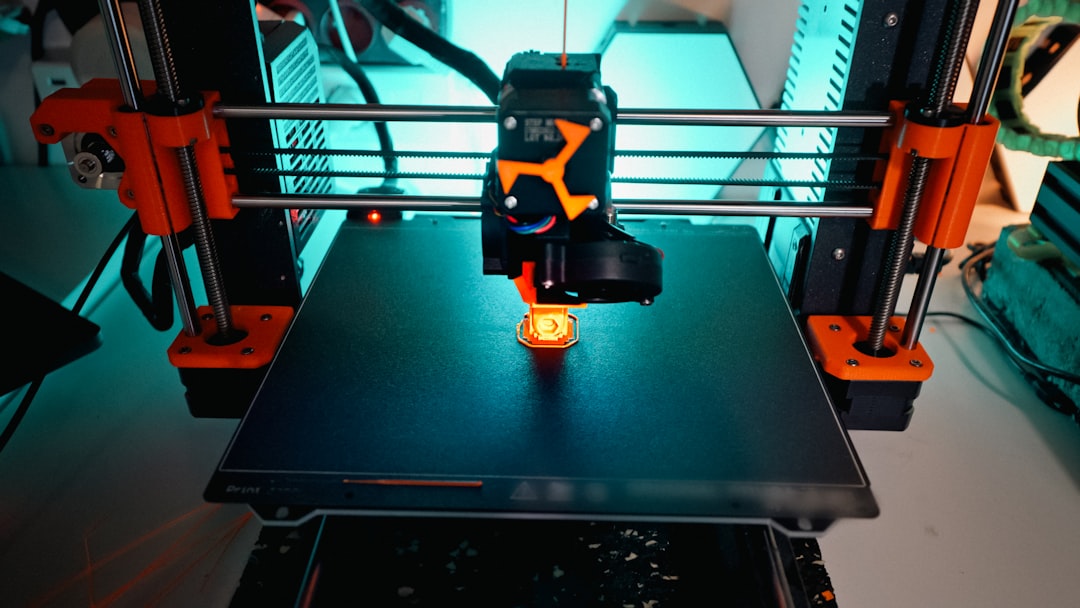
The Ender 3 V2 ships with a Bowden extruder setup. This means the extruder motor is mounted on the frame and pushes filament through a PTFE tube to the hotend. The Bowden tube on the Ender 3 V2 is approximately 60-65cm long.
This matters for retraction settings because the long PTFE tube introduces slack and compression. When the extruder retracts, it has to pull the filament backward through the entire tube length. The tube itself flexes slightly, absorbing some of the retraction force. This is why Bowden setups need longer retraction distances than direct drive systems.
The stock Ender 3 V2 hotend uses a PTFE-lined heat break, meaning the PTFE tube extends all the way down to the nozzle. This gives good performance with PLA and PETG but limits your temperature ceiling to about 240°C before the PTFE starts degrading. For our retraction tuning purposes, the PTFE liner actually helps because it reduces friction in the melt zone.
My Recommended Retraction Settings
After extensive testing, here are the retraction settings I recommend for the Ender 3 V2 in Cura:
Retraction Distance: 5mm
This is the most critical setting. The stock Cura profile for the Ender 3 V2 often suggests 5-6.5mm, which is a reasonable starting point. Through my testing, 5mm provides the best balance between stringing reduction and reliable filament feeding. Going higher than 6mm risks jamming because you pull molten filament too far up into the cold zone, where it solidifies and creates a plug.
Retraction Speed: 45mm/s
Speed determines how quickly the filament is pulled back. Faster retraction means less time for plastic to ooze out of the nozzle during the retraction movement. However, too fast and you risk grinding the filament or skipping steps on the extruder motor. 45mm/s is the sweet spot for the stock Ender 3 V2 extruder — fast enough to minimize ooze, slow enough to avoid grinding.
Retraction Prime Speed: 45mm/s
This is the speed at which filament is pushed back forward after a retraction. I keep this the same as the retraction speed. Some guides suggest a slower prime speed, but on the Ender 3 V2, matching speeds works well and prevents under-extrusion at the start of new lines.
Maximum Retraction Count: 10
This limits how many times the filament can be retracted within a given length of filament. Without this limit, small details with many travel moves can cause the same section of filament to be retracted dozens of times, grinding it down until the extruder loses grip. Set to 10 within a 5mm window.
Material-Specific Adjustments
The base settings above work for PLA. Other materials need slight tweaks:
PLA
- Retraction distance: 5mm
- Retraction speed: 45mm/s
- Temperature: 195-210°C
- Notes: PLA is the easiest material to tune retraction for. The settings above should give near-zero stringing with most PLA brands.
PETG
- Retraction distance: 4-5mm
- Retraction speed: 35-40mm/s
- Temperature: 230-245°C
- Notes: PETG is stringier than PLA by nature. You’ll likely never achieve zero stringing — the goal is to minimize it. Lower retraction speed helps because PETG is more viscous and can cause pressure buildups at high speeds. Also try enabling “Combing Mode: Within Infill” to reduce the number of retractions over visible surfaces.
ABS
- Retraction distance: 5mm
- Retraction speed: 40-45mm/s
- Temperature: 230-250°C
- Notes: ABS strings less than PETG at the same temperature. The base PLA settings work well with minor speed reduction. Make sure you’re printing in an enclosure — temperature fluctuations cause more surface defects than retraction ever will.
TPU (Flexible)
- Retraction distance: 0-2mm (or disabled)
- Retraction speed: 20-25mm/s
- Temperature: 220-235°C
- Notes: The stock Bowden setup on the Ender 3 V2 is not ideal for TPU. The flexible filament compresses in the long PTFE tube, making retraction unreliable. Many people disable retraction entirely for TPU and manage oozing through travel speed and coasting instead. If you print TPU regularly, consider upgrading to a direct drive extruder.
How to Test Your Retraction Settings
Don’t just set values and hope for the best. Print a retraction test to verify your settings are working:
The classic string test: Search for “retraction test” on Thingiverse or Printables. The most popular model consists of two or more thin towers spaced apart. The printer has to travel between towers on every layer, giving you a clear view of any stringing. If you see clean towers with no strings between them, your retraction is dialed in.
How to interpret results:
- Thick strings: Retraction distance too short. Increase by 0.5mm and retest.
- Thin, wispy strings: Usually a temperature issue, not retraction. Try dropping nozzle temperature by 5°C.
- Blobs at the start of lines: Over-priming. Reduce prime speed by 5mm/s or enable “Retraction Extra Prime Amount” at a negative value (-0.05 to -0.1mm³).
- Gaps/under-extrusion at line starts: Under-priming. Increase prime speed or add a small positive “Retraction Extra Prime Amount” (0.05-0.1mm³).
- Grinding sounds from extruder: Retraction is too aggressive. Reduce distance by 0.5mm and speed by 5mm/s.
Other Cura Settings That Affect Stringing
Retraction alone doesn’t eliminate stringing. These companion settings work together with retraction for the cleanest results:
Print Temperature: This is often more important than retraction settings. Higher temperatures make filament more fluid, which increases oozing and stringing. If you’re getting strings even with good retraction settings, try dropping your nozzle temperature by 5°C. For PLA, the sweet spot is usually 195-205°C on the Ender 3 V2. The stock 200°C is a good starting point.
Travel Speed: Faster travel means less time for oozing during non-print moves. The stock 150mm/s travel speed on the Ender 3 V2 is good. Some people increase it to 200mm/s, but beyond that, you risk the Bowden tube flexing too much and introducing artifacts. Stick with 150-200mm/s.
Combing Mode: Combing keeps the nozzle within the print’s boundary during travel moves, avoiding retractions entirely when possible. Set to “Within Infill” for the best results — this means the nozzle travels through infill (where strings don’t matter) rather than over walls where they’d be visible. This dramatically reduces visible stringing while minimizing retraction count.
Z-Hop: Z-hop lifts the nozzle slightly during travel moves. Enable it (0.2mm is typical) to prevent the nozzle from dragging across the print surface. However, Z-hop can increase stringing slightly because the nozzle isn’t wiped clean by the print surface. I enable it for PETG (where surface dragging causes blobs) and disable it for PLA (where the slight anti-stringing benefit of surface contact outweighs the drag marks).
Wipe Distance: This setting makes the nozzle travel along the print’s perimeter for a short distance after a retraction, effectively wiping the nozzle tip clean. Set to 1-2mm for best results. This catches the small amount of ooze that still occurs despite retraction.
Coasting: Coasting stops extrusion slightly before the end of each line, letting the residual pressure in the nozzle finish the extrusion. This reduces the blob of material available for stringing. Enable coasting with a volume of 0.04-0.06mm³. Too much coasting causes under-extrusion at the end of lines; too little has no effect.
Common Ender 3 V2 Retraction Problems
“I set retraction to 8mm and now I have clogs”
Classic over-retraction. When you pull filament too far back in a PTFE-lined hotend, molten plastic gets dragged into the cold zone where it solidifies. On the next prime, the extruder has to push through this solidified plug, causing a partial or full clog. Reduce retraction distance to 5mm maximum for the stock Ender 3 V2.
“Retraction works but I still get blobs”
Blobs at the start of extrusion lines are usually caused by pressure buildup in the nozzle, not insufficient retraction. Try enabling “Extra Prime Amount” at a slightly negative value (-0.05mm³) and increase travel speed to move away from the blob point faster. Also check that your filament diameter is set correctly (1.75mm, not 2.85mm).
“My prints have tiny zits on the surface”
This is often retraction-related but caused by the seam point where each layer starts and stops. In Cura, set “Z Seam Alignment” to “Sharpest Corner” or “User Specified” to hide the seam in an inconspicuous location. Also try “Outer Wall Wipe Distance” at 0.2mm to smooth the seam transition.
“Works for PLA but PETG is a stringy mess”
PETG will always be stringier than PLA — that’s its nature. Lower your PETG printing temperature as much as possible while maintaining layer adhesion (usually 225-235°C on the Ender 3 V2). Enable combing within infill. Accept that some post-processing with a heat gun or lighter may be needed for the best cosmetic results.
Upgrading Beyond Stock
If you’ve maxed out what the stock Bowden setup can do, consider these upgrades:
Direct drive conversion: Converting to direct drive (using kits from Micro Swiss, Creality, or printable designs like the Hemera or Orbiter mount) shortens the filament path from 60cm to about 3cm. This lets you reduce retraction distance to 0.5-1.5mm, dramatically reducing stringing and enabling reliable TPU printing. It’s the single best upgrade for print quality.
All-metal hotend: The Micro Swiss or Slice Engineering Copperhead all-metal hotend replaces the PTFE liner in the heat break. This eliminates the temperature ceiling of the PTFE tube and improves retraction performance at high temperatures. Essential if you print ABS or other high-temp materials regularly.
Capricorn PTFE tube: If you’re staying Bowden, upgrading to a Capricorn tube (tighter inner diameter tolerance) can reduce the slop that causes retraction inconsistency. It’s a cheap upgrade ($10-15) and easy to install.
My Final Settings Summary
Here are the complete retraction-related settings I use for the Ender 3 V2 with PLA in Cura. Copy these as a starting point and adjust based on your testing:
- Retraction Distance: 5mm
- Retraction Speed: 45mm/s
- Retraction Prime Speed: 45mm/s
- Retraction Extra Prime Amount: 0
- Maximum Retraction Count: 10
- Minimum Extrusion Distance Window: 5mm
- Combing Mode: Within Infill
- Travel Speed: 150mm/s
- Z-Hop: Disabled (for PLA)
- Wipe Distance: 1mm
- Coasting: Enabled, 0.04mm³
- Print Temperature: 200°C
Start here, print a retraction test, and adjust one setting at a time. The Ender 3 V2 is more than capable of producing string-free prints — it just needs the right settings to get there.