How to Fix a Bowden Tube Gap on Your 3D Printer: Symptoms, Causes, and the Permanent Fix
The Bowden Tube Gap Problem Explained
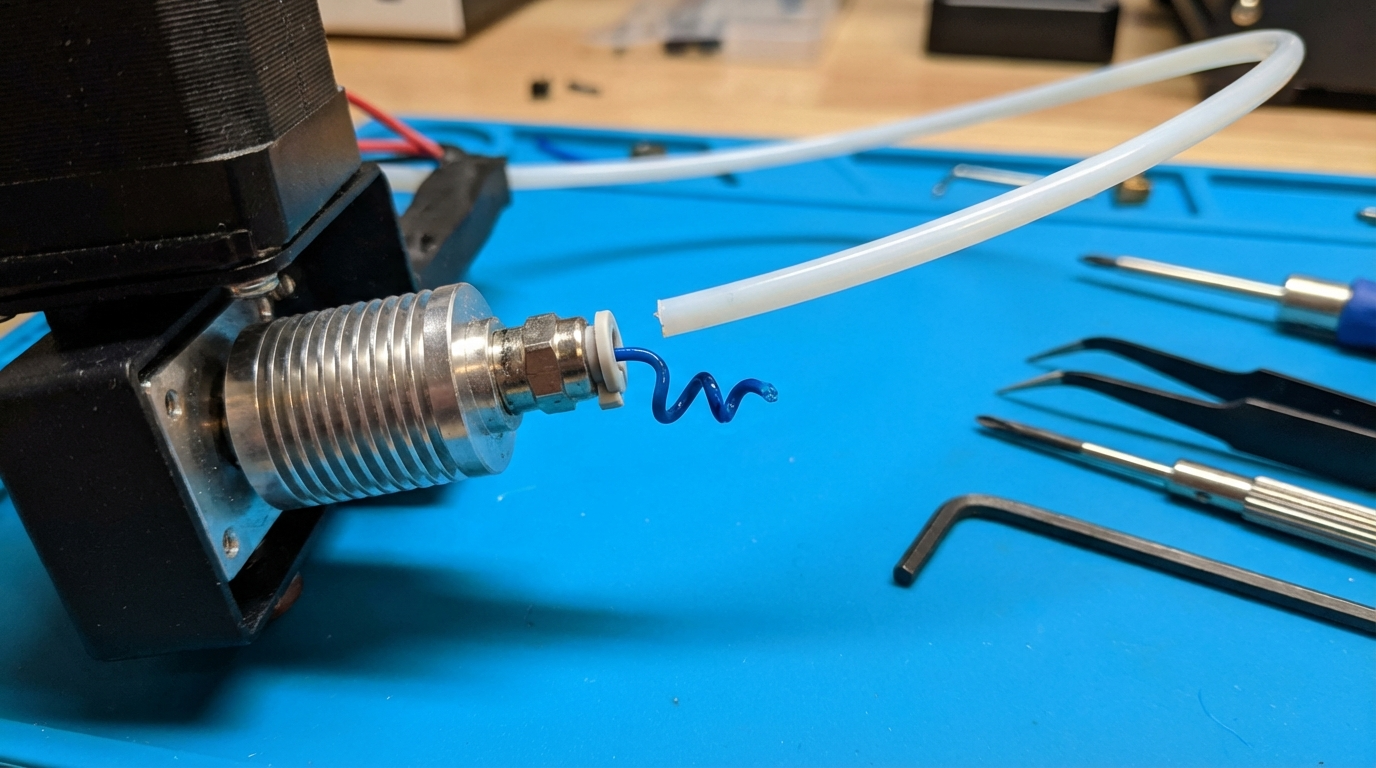
If your 3D printer has started under-extruding, producing inconsistent lines, clicking at the extruder, or leaving tiny blobs on the surface for no apparent reason — there’s a good chance you have a gap between your Bowden tube and the nozzle inside the hotend. This is one of the most common and most misdiagnosed problems in FDM printing, and it plagues every printer that uses a Bowden-style tube system.
The gap we’re talking about is tiny — sometimes less than 0.5 mm. But that microscopic space between the end of the PTFE tube and the back of the nozzle creates a pocket where molten filament accumulates, partially carbonizes, and eventually restricts or blocks flow entirely. It’s insidious because the symptoms develop gradually. Your prints slowly get worse over weeks or months, and you blame everything else before discovering the real culprit.
How the Gap Forms
In a properly assembled Bowden setup, the PTFE tube sits flush against the back of the nozzle, creating a seamless path for filament to travel from the cold zone into the melt zone. There’s zero space for filament to pool or accumulate.
The gap forms through several mechanisms:
Heat Cycling Loosening
Every time your printer heats up and cools down, the metal components expand and contract. Over hundreds of thermal cycles, the nozzle slowly unscrews or the pneumatic coupler holding the Bowden tube loosens its grip. Even a quarter-turn of loosening creates a measurable gap.
Retraction Pulling the Tube
Each retraction event applies a small upward force on the Bowden tube through filament friction. With aggressive retraction settings (long distance, high speed), this can gradually pull the tube out of the coupler’s teeth. Over thousands of retractions in a single print, the tube may shift by a fraction of a millimeter — enough to create a gap.
Tube End Degradation
PTFE begins degrading above 250°C. If you print PETG, ABS, or other higher-temperature materials, the end of the tube that sits inside the hotend slowly deteriorates, becoming soft, discolored, and deformed. The tube end mushrooms or melts back, creating a gap even though it hasn’t physically moved.
Poor Initial Assembly
Many budget printers arrive with the Bowden tube not fully seated. If the tube wasn’t pushed all the way down to contact the nozzle during assembly, there’s a gap from day one. The printer might work okay initially because the gap is small, but it grows worse as filament accumulates in the pocket.
Symptoms of a Bowden Tube Gap
The tricky thing about this problem is that the symptoms mimic half a dozen other issues. Here’s what to watch for:
- Gradual quality degradation: Prints that used to be perfect slowly get worse. Not a sudden failure, but a creeping decline.
- Inconsistent extrusion: Lines vary in width on the same layer. Some sections look fine, others are thin or have gaps.
- Extruder clicking/skipping: The extruder motor can’t push filament through the restriction. You hear rhythmic clicking, especially during fast extrusion.
- Stringing that won’t go away: You’ve dialed in retraction settings that used to work, but now stringing is back and nothing fixes it. The filament pool in the gap acts as a reservoir that oozes despite retraction.
- Random blobs and zits: Pressure irregularities from the clog cause random over-extrusion bursts on print surfaces.
- Filament jams during retraction: A blob of semi-carbonized filament in the gap catches on the tube end during retraction, causing a full jam.
- Dark specks in light-colored filament: Carbonized filament from the gap breaks loose and mixes into your print, showing as brown or black specks.
Diagnosing the Gap
Before tearing your hotend apart, confirm the gap exists:
The Cold Pull Test
- Heat your nozzle to printing temperature
- Push filament through manually until it extrudes cleanly
- Cool the nozzle to 90°C (for PLA) or 160°C (for PETG/nylon)
- Pull the filament out firmly and steadily
- Examine the tip: a properly sealed hotend produces a clean, tapered point. A gap produces a bulbous, mushroom-shaped tip — that mushroom is the shape of the gap where filament pooled
Visual Inspection
Remove the Bowden tube from the hotend. Examine the end that was inside — if it’s discolored, deformed, or has carbonized filament caked on the end, you had a gap. Also look down into the hotend with a flashlight. You should see the clean back of the nozzle. If you see a dark, crusty pocket, that’s accumulated carbonized filament.
Fixing the Bowden Tube Gap
Step 1: Clean the Hotend
Before reassembling, you need to remove the accumulated carbon from the gap:
- Remove the nozzle (heat to 250°C first — never remove a nozzle cold)
- Remove the Bowden tube from the top
- While hot, push a piece of PETG or nylon filament through from the top. It will push out the carbonized crud.
- Repeat with fresh filament until it comes through clean
- Alternatively, soak the heatbreak in acetone overnight (for ABS residue) or use a small drill bit to carefully clear the bore
Step 2: Cut a Fresh Tube End
Never reuse a tube end that’s been in the hotend. Even if it looks okay, the end is likely deformed or softened.
- Use a dedicated PTFE tube cutter (about $8 on Amazon) for a perfectly square cut
- If using a razor blade, score around the circumference first, then cut through. Avoid crushing the tube.
- The cut must be perfectly flat and perpendicular. Any angle creates a gap on one side that filament will exploit.
- Check the cut by standing the tube on a flat surface — it should sit flat with no rocking.
Step 3: Reassemble with the Correct Procedure
This is where most people create the gap in the first place. The correct assembly order matters:
- Screw the nozzle into the heater block, then back it out 1/2 to 1 full turn (this is critical — you’re leaving room for the heatbreak to butt against the nozzle)
- Screw the heatbreak into the heatsink/heat block until it contacts the nozzle
- Push the Bowden tube all the way down through the coupler until you feel it hit the back of the nozzle. Push firmly.
- Heat the hotend to 250°C
- Tighten the nozzle with a wrench (1/4 turn past snug). This pulls the heatbreak tight against the nozzle, sandwiching the Bowden tube end and creating a zero-gap seal.
- Hold the heater block with a second wrench while tightening to avoid twisting the wires
The hot-tightening step is essential because thermal expansion closes any remaining play in the threads. A nozzle tightened cold will develop a gap when heated.
Preventing the Gap from Returning
Use a Bowden Tube Clip
The pneumatic couplers on most printers (those blue clips that came with your printer) are barely adequate. Over time, the internal teeth wear and lose grip on the tube. Aftermarket solutions include:
- Upgraded couplers: PC4-M10 pneumatic fittings with better tooth design (about $5 for a 5-pack)
- Collet clips: Small C-clips that slide over the coupler and prevent the teeth from releasing. Often included with Capricorn tube kits.
- 3D printed tube locks: Various designs on Printables/Thingiverse that mechanically prevent tube movement
Upgrade to Capricorn PTFE Tubing
Capricorn XS series tubing has a higher temperature rating (up to 260°C vs. 240°C for generic PTFE) and tighter inner diameter tolerance (1.9 mm vs. 2.0 mm standard). The tighter bore reduces filament play and retraction-induced tube movement. The higher temp rating means less degradation at the hot end.
Limit Retraction Distance
Long retractions (>5 mm on Bowden setups) increase the cyclical pulling force on the tube. Optimize your retraction distance to the minimum that prevents stringing — typically 3–5 mm for most Bowden printers. Less retraction = less tube movement = longer time before the gap develops.
Consider an All-Metal Heatbreak
All-metal heatbreaks eliminate the PTFE tube from the hot zone entirely. The tube stops at the top of the cold section, well away from melt temperatures. This eliminates PTFE degradation and reduces the consequences of a small gap (since any gap is in the cold zone where filament is solid). Popular all-metal upgrades include the Micro Swiss and Slice Engineering Copperhead.
The trade-off: all-metal heatbreaks can be more prone to heat creep and may produce more stringing with PLA. They excel with PETG, ABS, and high-temp materials.
Bowden Gap vs. Other Clogs: Differential Diagnosis
Since bowden tube gaps mimic other problems, here’s how to tell them apart:
- Bowden gap: Gradual onset, cold pull shows mushroom tip, tube end discolored. Symptoms worse after many prints.
- Partial nozzle clog: Can be sudden or gradual. Cold pull shows foreign material embedded in tip. Nozzle swap fixes it immediately.
- Heat creep: Filament jams in the cold zone above the melt area. Happens more on long prints. Hotend cooling fan is usually the issue.
- Wet filament: Popping/crackling sounds during extrusion. Steam bubbles visible in extruded filament. Stringing is stringy/hairy rather than blobby.
- Worn nozzle: Gradual quality loss but cold pulls look normal. Line width increases as the orifice wears larger. Most common with abrasive filaments (CF, GF).
Maintenance Schedule to Prevent Bowden Gaps
Prevention is infinitely better than disassembling your hotend every month. Follow this schedule:
- Every 200 print hours: Do a cold pull to check for gap formation. If the tip shows any mushrooming, plan a tube reseat.
- Every 500 print hours: Remove and inspect the Bowden tube end. Trim if discolored. Re-seat with fresh cut.
- After any nozzle change: Always re-seat the Bowden tube and hot-tighten. This is the #1 time gaps get introduced.
- After switching to higher-temp filaments: Check the tube end more frequently. PETG and ABS accelerate tube degradation.
Final Thoughts
The Bowden tube gap is a frustrating problem because it hides behind symptoms that point everywhere else. But once you know what to look for — the gradual quality decline, the mushroom-shaped cold pulls, the discolored tube end — diagnosis is straightforward and the fix takes 15 minutes. Proper hot-tightening assembly, a quality tube with a clip, and periodic cold-pull inspections keep the gap from forming in the first place. It’s maintenance, not repair, and your prints will thank you for staying ahead of it.