PLA Still Stringing With Retraction On: Six Causes That Are Not Retraction
The frustration of stringing that retraction does not stop
You opened the slicer, enabled retraction, set distance and speed to the values everyone recommends, and the prints still come out covered in fine plastic webs between features. Adding more retraction made it worse. Adding less retraction made it worse. You are not crazy — retraction-resistant stringing is a real category of failure, and it has six common causes that have nothing to do with retraction settings.
This article walks through them in the order you should check, from cheapest fix to most expensive.
First, confirm retraction is actually firing
Before chasing exotic causes, prove the obvious. Watch the printer during a non-print travel move. The extruder gear should visibly retract — you will see the filament pull back into the hotend. If it does not, retraction is configured in the slicer but not being commanded for that move.
The most common reason: retraction minimum travel distance is set higher than the actual travel distance. If your travel between two stringy features is 1.5 mm and your minimum is 2 mm, retraction is skipped. Drop the minimum to 0.8 mm or lower. Some default profiles ship with this set absurdly high.
Second common reason: combing or “avoid crossing perimeters” is enabled and the slicer is taking long curved paths around the part instead of crossing it. Travel distance technically goes up, but the path stays inside the part where any oozing gets covered. If you see strings across the gaps anyway, combing is not actually saving you and you should disable it.
Cause #1: wet filament
This is the answer in maybe 60% of “retraction does not help” cases. PLA is mildly hygroscopic. After two to four weeks of exposure to typical indoor humidity, PLA absorbs enough moisture to start steaming through the nozzle. Steam pressure pushes filament out during travel moves regardless of retraction.
How to tell: hold a fresh-out-of-bag PLA spool and your suspect spool side by side. Print the same model with the same settings on both. If the fresh spool has 80% less stringing, the suspect spool is wet.
Practical confirmation: extrude 50 mm of filament onto a clean surface and watch the strand. Dry PLA extrudes as a smooth glossy line. Wet PLA extrudes with visible bubbles, audible pops, and a matte finish. If you hear popping, your filament is wet.
Fix: dry at 45-50°C for 4-6 hours in a filament dryer or food dehydrator. Print immediately afterward. Resume normal storage in a sealed bag with desiccant.
Cause #2: nozzle temperature too high
Default PLA temperature is usually 200-210°C. Cheaper or older PLA tolerates that fine. Premium PLA (Polymaker, Prusament, eSun PLA+) often prints better at 195-200°C and strings noticeably more at 215°C+. Each filament has a temperature sweet spot, and going above it makes the molten PLA so fluid that retraction cannot pull it back fast enough to prevent ooze.
The fix is a temperature tower. Print one at 5°C increments from 220°C down to 190°C. The lowest temperature where layer adhesion stays acceptable is your target. Most temp tower failures are at the top — the bottom rarely shows under-extrusion if you are printing PLA.
One catch: temperature towers print fast and small. They tell you the optimum for fast small prints. Larger and slower prints with longer layer times benefit from running 3-5°C cooler than the temp tower’s optimum. The temperature soaks into the previously printed material more during longer prints.
Cause #3: hotend temperature drift
Your slicer says 200°C. Your printer’s display says 200°C. Your actual nozzle is at 215°C because the thermistor is loose, the thermistor is the wrong type for your firmware, or the PID is poorly tuned and overshooting. This shows up in three ways: stringing that came on suddenly without changing filament, stringing that varies by print position on the bed, and inconsistent first-layer adhesion.
Fix: re-run PID autotune. On Marlin: M303 E0 S200 C8, then M500. On Klipper: PID_CALIBRATE HEATER=extruder TARGET=200, save and restart. Verify the thermistor connector is fully seated and the wires are not pinched at the hotend mount.
If you have an IR thermometer, point it at the heater block when the printer says 200°C. The reading on aluminum should be 195-205°C; a 10°C+ deviation means thermistor or PID issues.
Cause #4: extruder grip on the filament
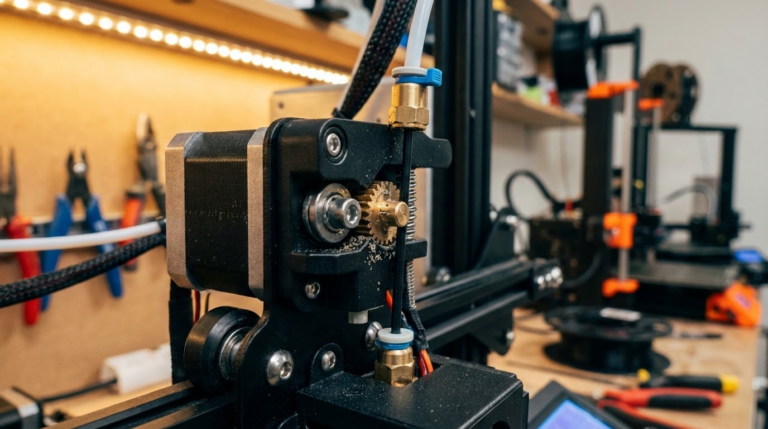
Retraction physically pulls filament backward. If the extruder gear cannot grip the filament hard enough, retraction commands the motion but the filament does not actually move — or only moves partway. This is more common on Bowden setups, but happens on direct drive too if the spring tension is wrong or the gear is worn.
Fix on Bowden: tighten the extruder lever spring, verify the PTFE tube is fully seated against the nozzle, and check for filament gouges where the gear bites. Worn brass gears on cheap extruders are a common silent failure.
Fix on direct drive: same gear and spring checks. On dual-gear extruders both gears should leave a clean bite mark — if only one is gripping, the alignment is off.
A clean test: take a 200 mm length of filament, mark it 100 mm from the entry, command 100 mm of extrusion, and measure how much actually went through. More than 5 mm of error means the extruder is slipping or the steps-per-mm is wrong.
Cause #5: nozzle ooze on travel start
Some slicers issue retraction at the start of travel, then run the toolhead at high speed across the gap, then unretract at the destination. This works if travel speed is high enough that ooze cannot accumulate. If travel speed is low, the retracted filament continues to ooze gas and small amounts of plastic, leaving thin strings.
Fix: raise travel speed. 150 mm/s is the minimum for stringy filaments; 200-250 mm/s is better. Watch for travel moves that hit acceleration limits — the slicer may report 200 mm/s travel but the printer may only achieve 80 mm/s on short moves because it never reaches full speed. This is most common on bed slingers with low Y acceleration.
Z-hop is a related setting. Lift Z 0.2-0.4 mm during travel, especially on tall thin features where dragging the nozzle across them re-melts and pulls filament out. Z-hop adds time, so use it selectively.
Cause #6: pressure advance not tuned
If you are running Klipper or a firmware that supports Linear Advance, an untuned pressure-advance setting causes stringing that looks identical to retraction failure. The mechanism: pressure advance balances the nozzle pressure during deceleration and acceleration. Without it, pressure stays high after a perimeter ends and oozes during the subsequent travel even though retraction was commanded.
Fix: run the pressure advance calibration print. The Klipper docs include the gcode and instructions. The number for direct drive PLA is typically 0.04-0.06; for Bowden it is 0.4-0.7. Without calibration, the default is usually 0, which is worse than nothing.
Putting it in order
If you are working through this list cold, here is the priority based on how often each cause is the real culprit:
- Wet filament. Dry it. (60% of cases.)
- Nozzle temperature too high. Drop 5-10°C. (15% of cases.)
- Extruder slipping. Tighten and inspect. (10% of cases.)
- Travel speed too low. Raise to 200 mm/s. (5% of cases.)
- Pressure advance untuned. Calibrate. (5% of cases.)
- Hotend temperature drift. Re-PID and check thermistor. (5% of cases.)
Most “retraction does not stop my stringing” complaints are filament problems pretending to be slicer problems. Drying the spool first will save you hours of slicer fiddling.
What good retraction settings look like once everything else is right
For a properly working setup with dry filament and tuned hardware, retraction settings should be modest:
- Direct drive: 0.6-1.2 mm distance, 35-45 mm/s speed.
- Bowden: 4-6 mm distance, 35-50 mm/s speed.
If you are running 8 mm direct drive retraction or 12 mm Bowden retraction to control stringing, the settings are masking a different problem. Drop retraction back to normal once the underlying cause is fixed and the prints will improve, not worsen.
Why over-retraction makes stringing worse
This is counterintuitive but real. Excessive retraction pulls air into the melt zone. On the next extrusion, that air pocket releases as the filament re-enters the nozzle, creating a brief gap in extrusion followed by a spurt as the back-pressure equalizes. The spurt deposits exactly the kind of tiny string people are trying to eliminate.
Direct drive setups feel this most. A 1.5 mm retraction on direct drive is plenty; 3 mm is too much; 5 mm causes new problems. If your retraction climb chart shows stringing improving from 0.5 to 1.5 mm and then getting worse from 2 to 5 mm, you have hit the over-retraction zone.
The retraction calibration print
If you have not run a retraction tower, run one. The standard model has two pillars connected by stretches of empty travel — print it varying retraction distance from 0.5 to 8 mm in 0.5 mm increments per band. The cleanest band is your distance setting.
Two notes. First, run this with dry filament. Wet filament gives noisy results and often shows no clear best value. Second, run a separate tower for retraction speed at the optimal distance. Distance and speed interact — high speed (50+ mm/s) is sometimes better at small distances, while low speed (25-30 mm/s) is sometimes better at large distances because the filament has time to depressurize.
When to give up and switch filament
Some PLA simply strings more than other PLA. Cheap unbranded PLA from marketplace sellers often shows persistent stringing that no calibration cleans up because the polymer mix has too much amorphous content and an irregular melt curve. If you have tried everything in this list and one specific spool still strings, the answer is to use that spool for rough prototypes and buy a known-good brand for visual prints.
Premium PLA brands that string predictably less in our experience: Prusament, Polymaker PolyLite, eSun PLA+, Atomic. Brands that vary spool-to-spool: Hatchbox, Inland, Overture. This list is not exhaustive but it is a starting point if filament quality is the suspected cause.